
 What it does
Projects, money and assets, in one place.
One platform for projects, ERP and assets, shown here on a demonstration project. Update something once and it carries through to the dashboard, the reports, the accounts and the people who need it.
 Projects: programme
Import the programme and keep the logic.
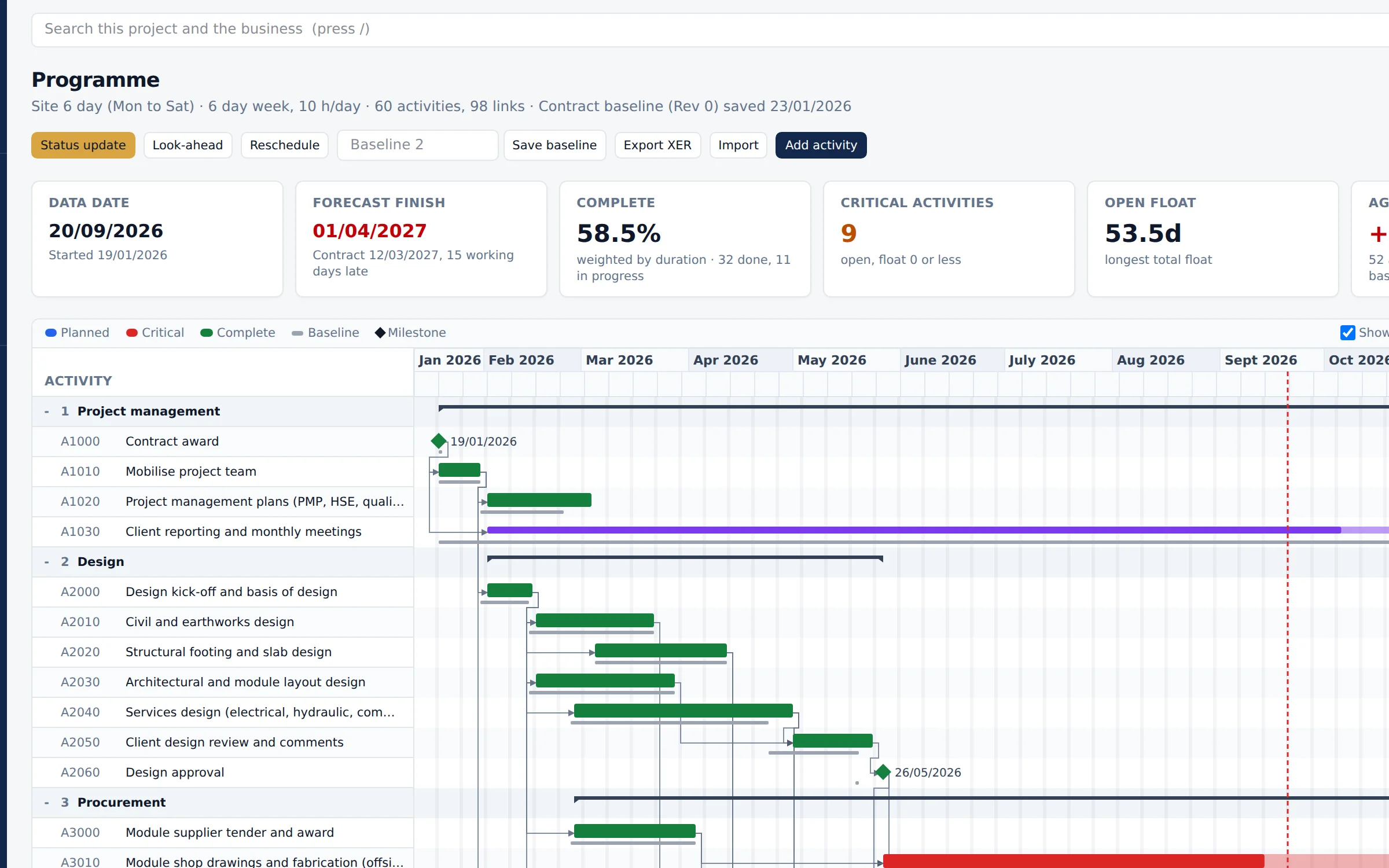
Import P6 XML, XER or Microsoft Project and keep the logic. Progress is captured once from the site record and flows through to earned value, the S curve and the look ahead.
A switch at the top of the page moves between the Gantt chart, the site model in 3D and the construction sequence in 4D, built out against the live dates and a baseline. Items drawn from the standard library are badged as indicative rather than design.
 Projects: contract
Time bars tracked against real dates.
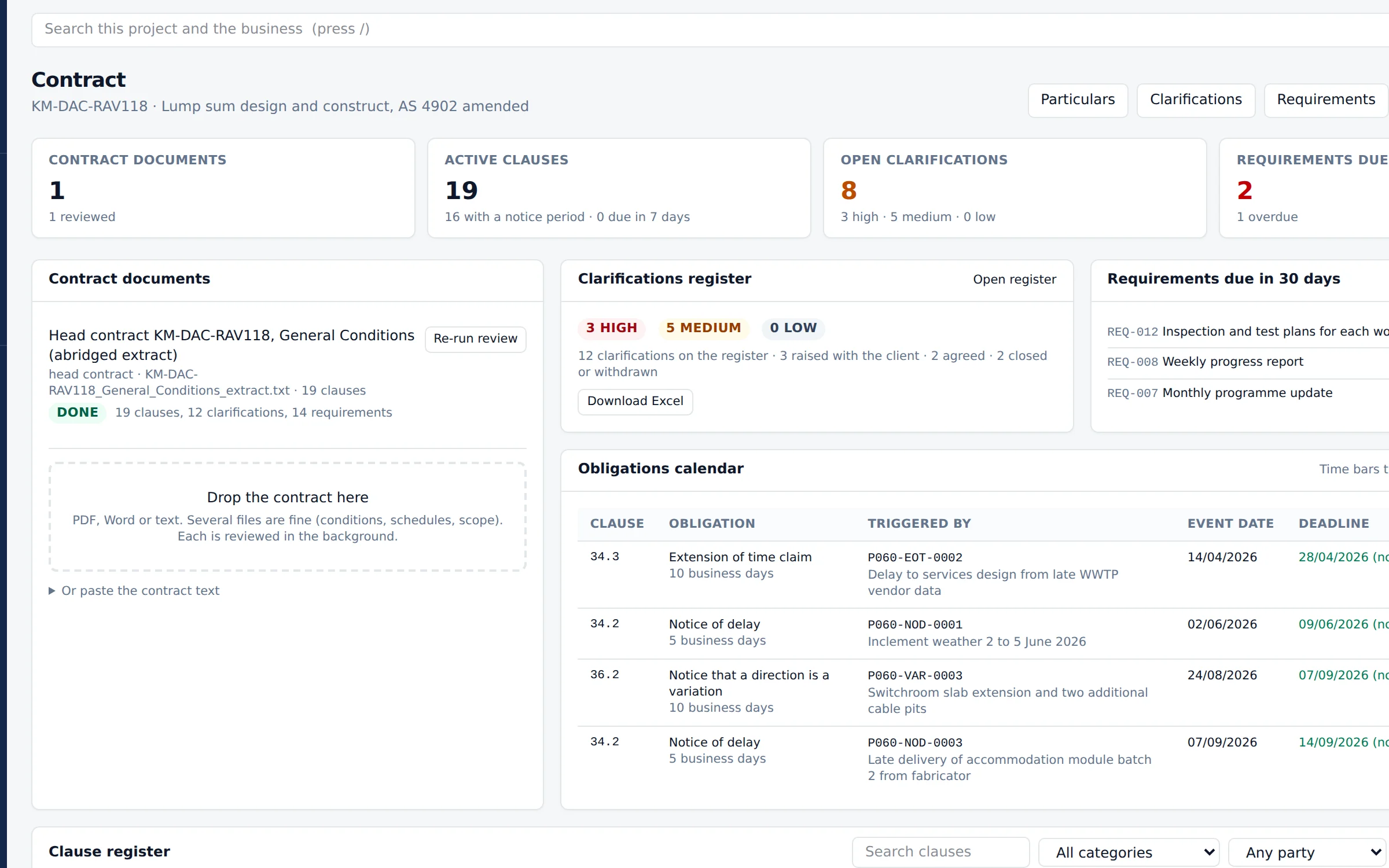
Upload the contract and Cornerstone builds the clarifications and requirements registers, then tracks the time bars against real dates and tells you which one is about to run out.
The notice and time bar clocks follow your form of contract. AS 2124, AS 4000, AS 4902, AS 4905, AS 4906, GC21, NEC4 ECC and FIDIC 2017 are supported contract forms, each with its notices, periods and what happens when a period is missed, and a warning comes before anything is treated as approved or rejected. On NEC4 jobs compensation events run with the Project Manager's reply clocks. Open book, target cost and alliance jobs show Defined Cost, disallowed cost, the target and the pain and gain share, and joint ventures split cost and revenue by partner.
Retention follows the regime each contract uses: the WA retention trust, trust ledgers for the other states marked check until a lawyer has reviewed their rules, cash retention, bank guarantees and project bank accounts. The Superintendent or Project Manager sees what is waiting to be assessed, with the days left.
 Projects: site and safety
The weekly report writes itself.
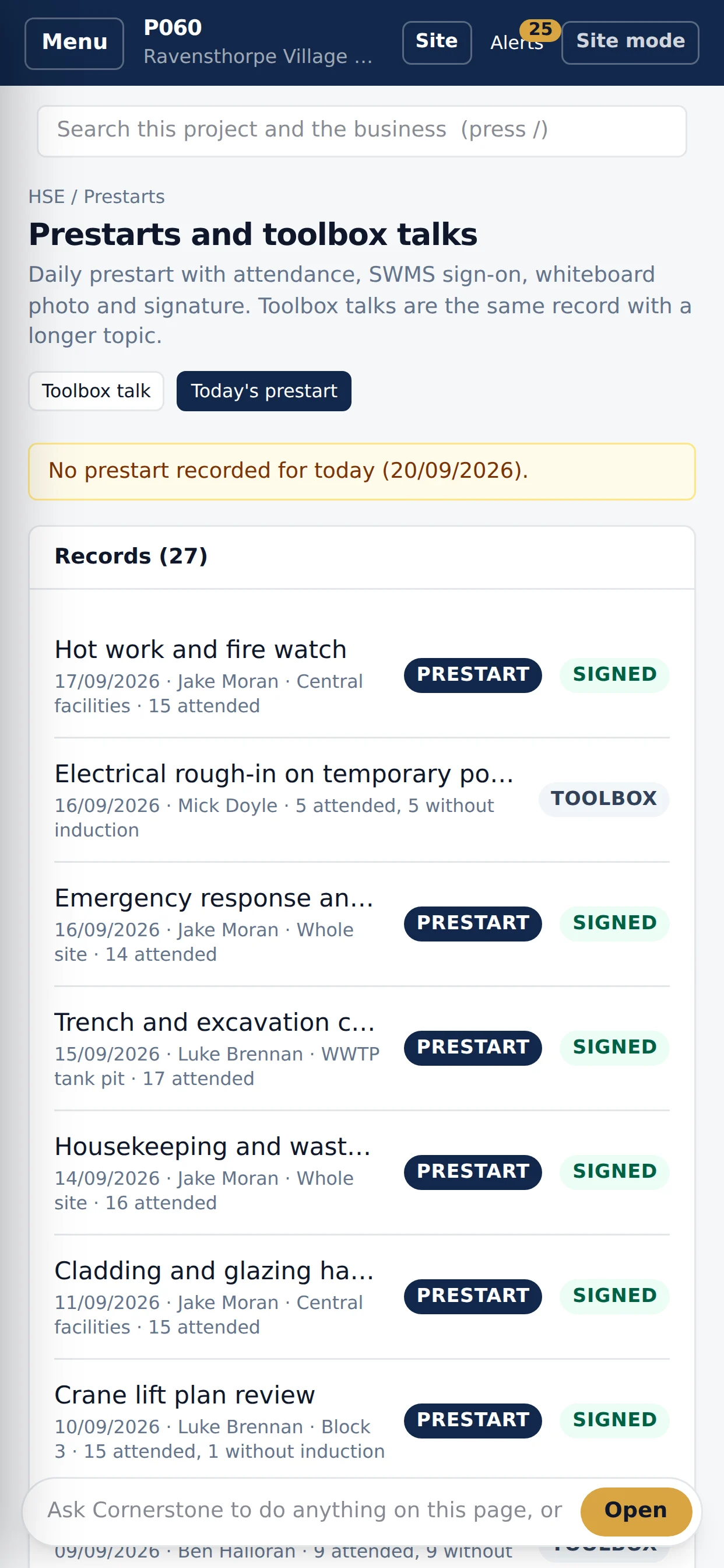
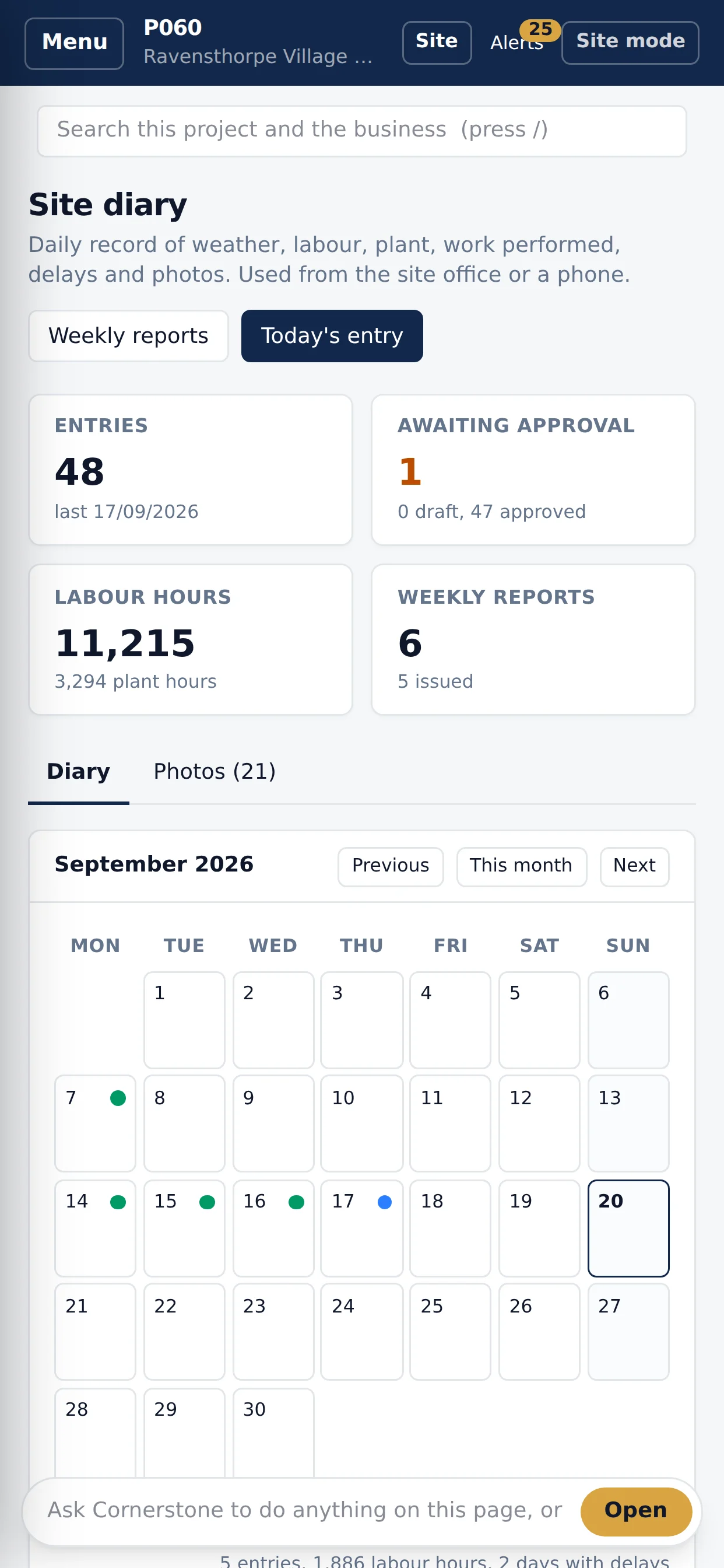
Prestarts, toolbox talks, plant checks, hazards, inspections, quantities, photos and diaries on a phone. Site forms keep working when the coverage drops and send themselves when the signal returns. The weekly report writes itself from them.
 Money: commercial
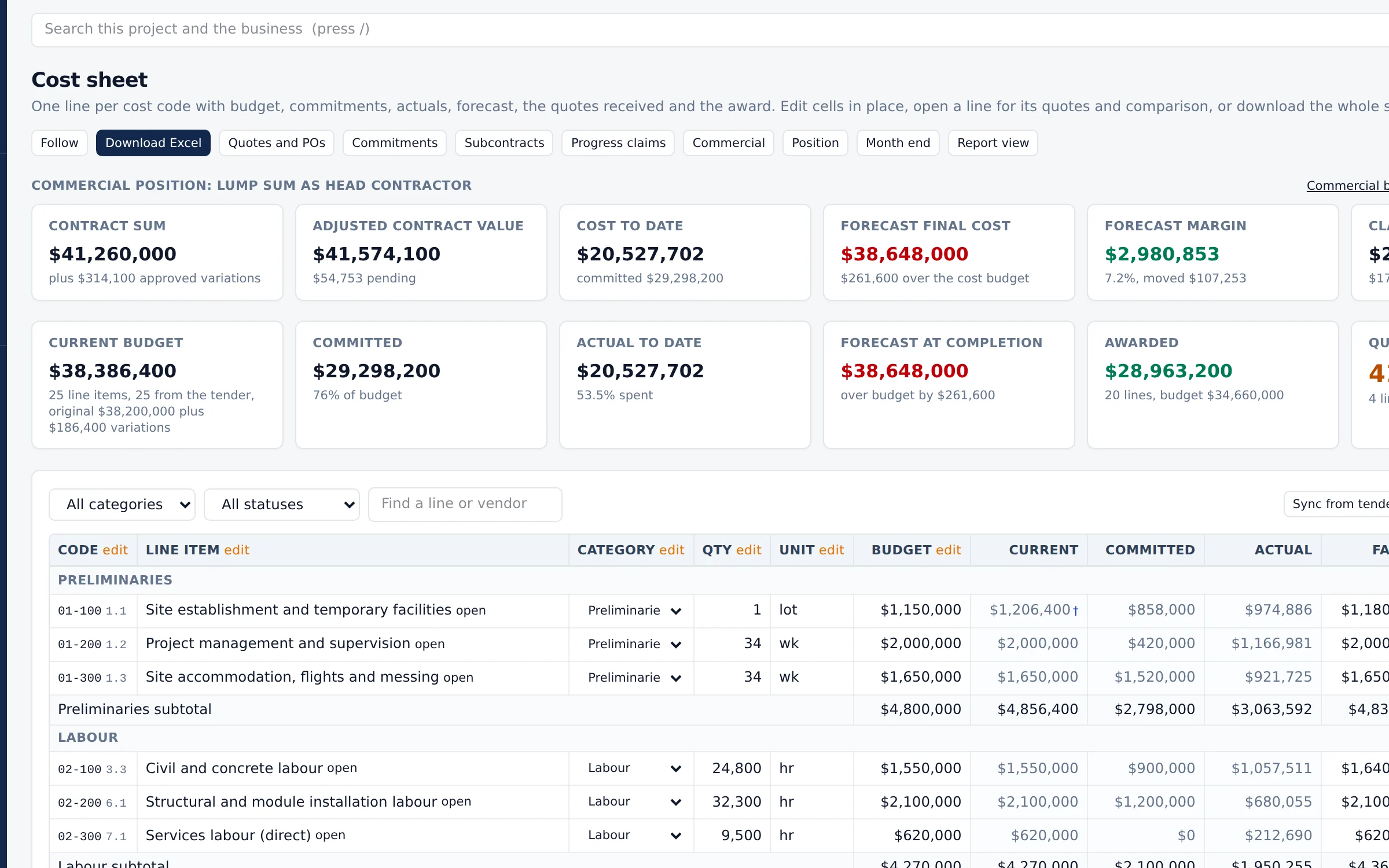
The priced tender becomes the cost sheet.
The priced tender becomes the cost sheet. Each line opens its own sheet of quotes, comparisons, commitments and actuals.
Claims, variations and forecasts run off the same lines, so the dashboard and the commercial manager are working to one number.
Every subcontract claim lands on one register, whether your team logs it, it comes from a proforma or the subcontractor lodges it on the portal. The Security of Payment dates are worked out for the state the project is in, with the Act named on the record and the state marked check until a lawyer has reviewed its rules. Payment schedules are issued as numbered documents with reasons, and when, how and where each one was served is recorded.
A job already under way brings its budget, commitments, variations and past claims across from Excel. The Business stats tab rolls safety, commercial, delivery and workforce figures up across the projects each person can see, by month, quarter, financial year and five years.
Each person arranges their own business and project dashboards: show, hide, reorder and resize cards, add the ones they are allowed to see and go back to the business's layout at any time. The figures open the records behind them, already filtered, and the list adds up to the figure clicked.
Each line says how its forecast was worked out, from the budget, what is committed, cost to date plus the work to go, earned value or productivity, and the method can be chosen line by line. Lines roll up into control accounts with a manager, the budget baseline moves only through approved change or a recorded decision, and earned value is measured from rules of credit against the cost booked. One month-end close freezes the forecast, earned value, change, risk and cash flow, and a line outside its variance band needs an explanation before the month closes.
Trends sit before formal variations and count in the forecast at their likelihood, and a head contract variation links to the subcontract side so both halves of the margin show on one line. Cost risk runs with the programme for P50 and P90, with contingency and management reserve kept apart. Approved subcontract payments show whether they are ready to pay and why not, and a payment run makes the bank file from verified bank details only.
 Money: accounts, payroll and assets
Do the work here. The ledger stays where it is.
Supplier bills, subcontract claims and claims to your client are approved in Cornerstone, coded to your accounts and passed to your accounting platform. Today they go across in the files Xero and MYOB import, and a direct connection to both is being registered.
Approved timesheets and leave go to payroll by pay period. Xero, Employment Hero or MYOB runs the pay and lodges it, and the results come back to Cornerstone.
Capital items go on the fixed asset register with depreciation worked out each month, linked to the asset they paid for. Only the ledger, payroll processing and tax lodgement stay in the accounting or payroll platform you already use.
- Accounts payable
- Accounts receivable
- Payment runs and bank files
- Pay periods and timesheets
- Fixed assets and depreciation
- Payment Times Reporting figures
Money: revenue and joint venturesRevenue as well as cost.
Offtake and power purchase agreements are kept by entity and project, with the tariff, CPI or fixed escalation, floor and cap, and take-or-pay. Delivered volumes are typed in, imported or read from an Operate meter, and each period's invoice is worked out, approved and sent to your accounting platform as a sales invoice.
The AASB 15 revenue schedule shows revenue recognised against billed, with the contract asset and liability, and a monthly journal moves the ledger to match. The forecast runs each contract to the end of its term against the project's funding.
Joint ventures keep each partner's capital account with contributions, distributions and branded statements. Carried interest moves a partner's share onto the others until a cap or milestone, and government co-funding claims are prepared from the project's own eligible costs.
- Offtake and PPA contracts
- Indexed billing
- AASB 15 revenue schedule
- Partner capital accounts
- Carried interest
- Co-funding claims
AssetsCornerstone Operate runs the asset in service.
What a project builds, or a business already owns, carries on in Cornerstone Operate once it is handed over: one asset register with its locations, drawings and records from the project that delivered it.
Work orders, maintenance plans, readings and downtime, stores, fleet, facilities and compliance run on the same record, and the cost of keeping each asset working is recorded against it.
The Cornerstone asset class library covers solar, battery storage, high voltage, generation, hydrogen, pipelines, data centres and site infrastructure. Each class brings its nameplate fields, failure modes, a starting maintenance plan, inspections and spares, as a starting point your engineers confirm.
- Asset register and hierarchy
- Work orders and requests
- Planned maintenance
- Readings and downtime
- Stores and spares
- Fleet and facilities
- Asset class library
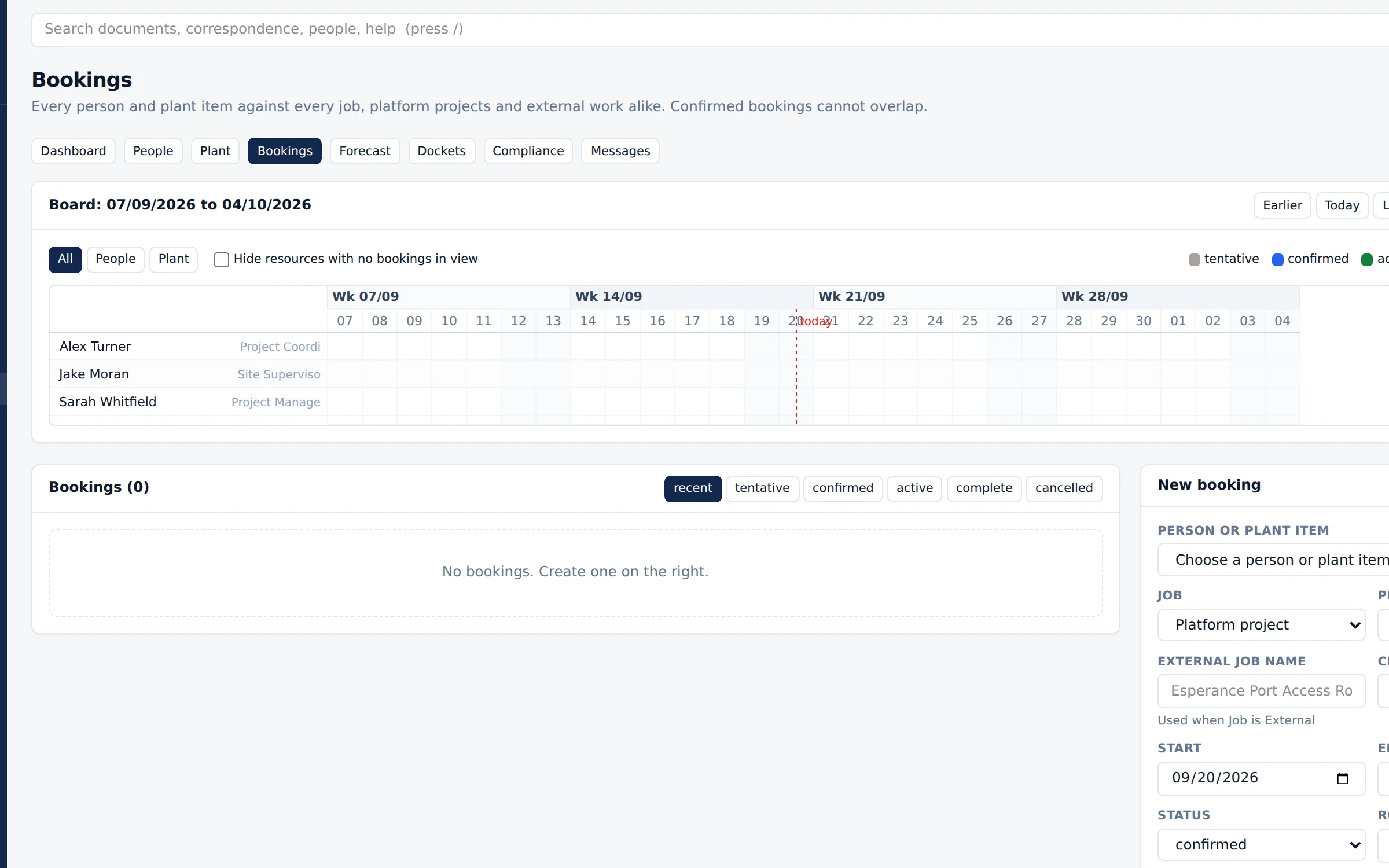
PeoplePeople management.
Employment records, classifications and instruments against the project. Tickets, clearances and health monitoring carry an expiry, so what falls due in the next sixty days is on the screen.
Leave goes to the manager and lands on the resourcing. Approved timesheets and leave go to payroll by pay period, with pay amounts and bank details visible only to the people allowed to see them.
My calendar brings meetings, inspections, leave and due dates into one place you can subscribe to from your phone. Messages carries one to one and group conversations, and a message that matters becomes an RFI, a site instruction or a diary note in one step. Each person signs in with their own account, with a sign-in code where the business requires one.
 Documents
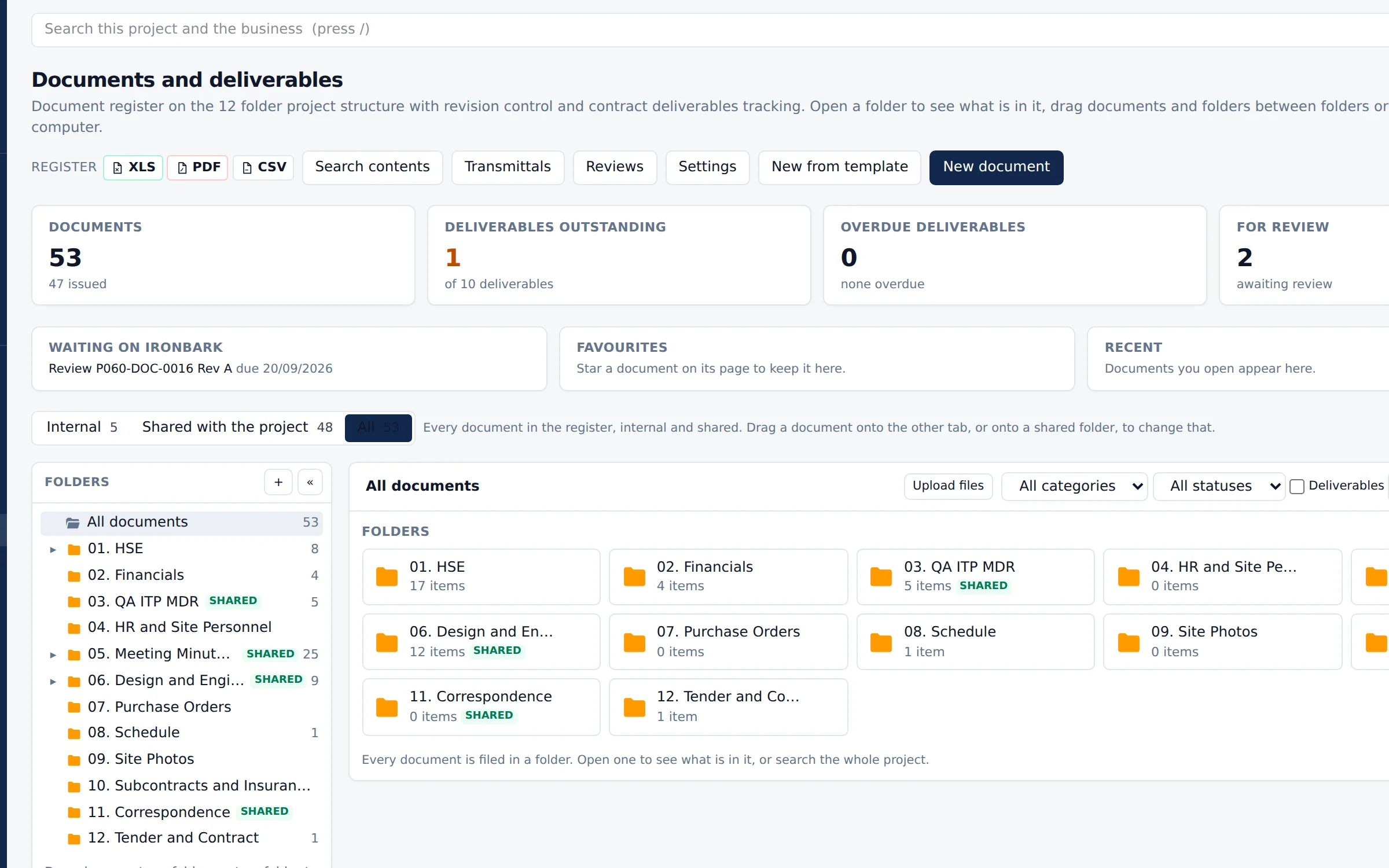
The platform filing system.
A register that behaves like a folder. Drag files in, move them between folders, and everything the platform produces files itself. Revisions, transmittals, reviews and sign off without a separate document control system.
Tick documents or drawings on any register, or search results, and issue a transmittal, attach them to correspondence or download a zip. Recipients are typed in like Outlook, with To, CC and BCC, people from every party, outside addresses and distribution lists. Correspondence, transmittals and notices are emailed to anyone, inside Cornerstone or not, from your business's name, and replies come back into the project's correspondence on their own. Documents brought across keep their own names and numbers.
Word and Excel documents open in the platform and can be edited by several people at once, saving as a new revision and staying in step with a linked Dropbox or SharePoint file.
 Documents: templates and reports
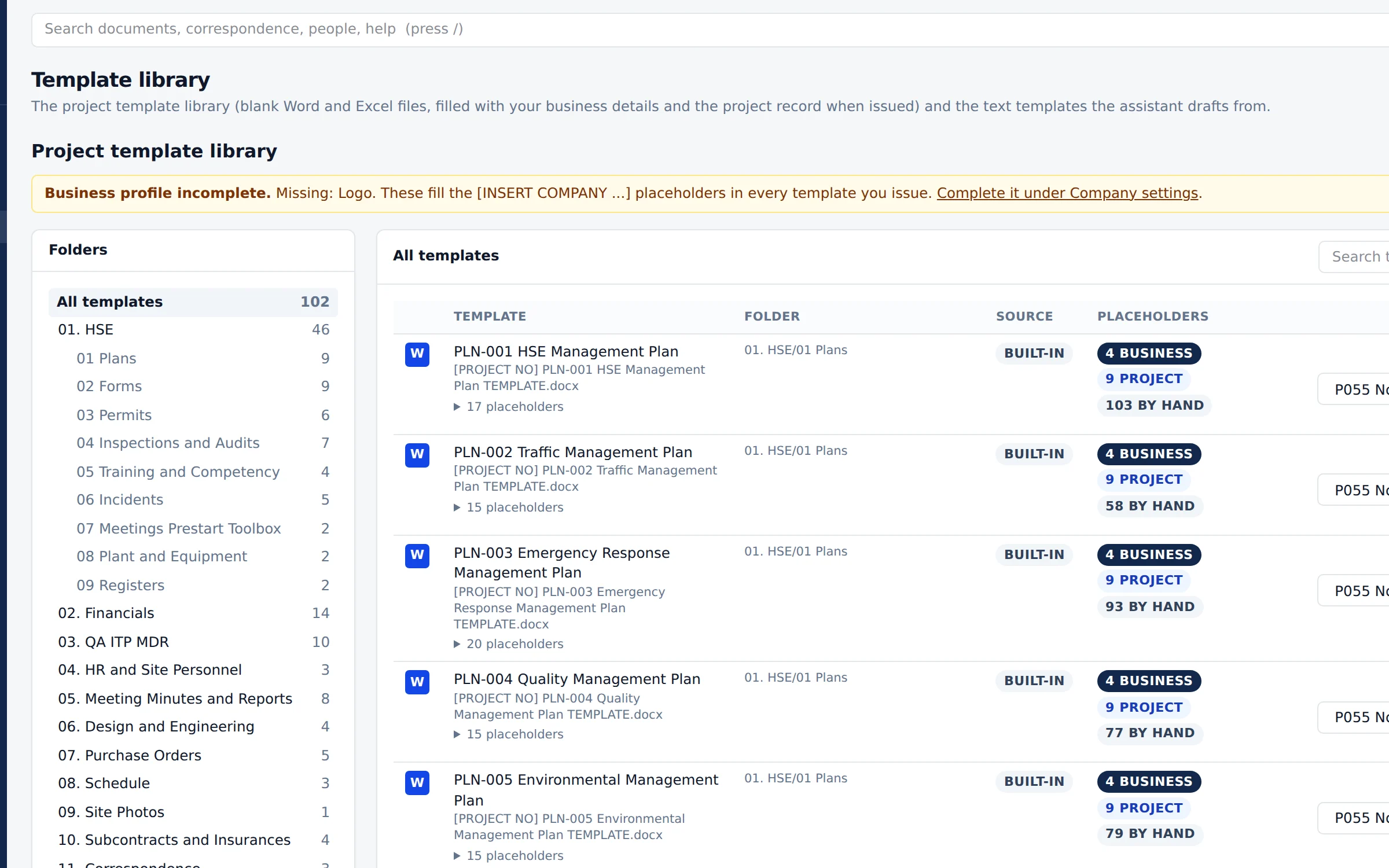
More than a hundred, filled in for you.
More than a hundred blank Word and Excel templates covering safety, financials, quality, HR, minutes, design, purchase orders, programme, subcontracts, correspondence and tender.
Each one fills itself with your business details and the project record when it is issued.
Bring your own forms too. Forms in an import go into the template library, and RFIs, TQs, site instructions and design changes download on your own Word form, filled in. Cornerstone learns your house style from your forms and restyles its templates and downloads to match, and if a printout is not right you tell Cornerstone what is wrong and it changes the template, with versions and approval.
Bring your own report formats as well, as many as you like: give Cornerstone your Word or Excel layout and it fills it from the project. Every PDF, Word and Excel download carries your company branding and not Cornerstone's, and mail sent from Cornerstone carries your company email signature.
 Groups and enterprise
A group of companies on one platform.
Several companies in one group, each with its own financial year and currency. Daily exchange rates from the Reserve Bank of Australia convert the figures, and the group reports together.
For a business that keeps its own ERP, connectors to Oracle Fusion and SAP S/4HANA start in a sandbox and send only once the business has tested and switched them on. Tenements, exploration licences and their expenditure commitments have a register of their own.
The implementation workspace takes a business live in weeks: a week by week plan, readiness checks, project folders brought across from SharePoint and records imported from Aconex and Unifier. The trust centre and audit pack show your auditors the controls in place, aligned to ISO 27001 and SOC 2. Cornerstone is not certified to either yet.
- Groups and entities
- Multiple currencies
- Daily exchange rates
- ERP connectors
- Tenements
- Implementation workspace
- Trust centre and audit pack
Ask CornerstoneThe same bar on every page.
Ask Cornerstone is the built-in AI, and every page carries the same bar. Ask a question and the answer comes from the project in front of you. Ask for work and it is carried out and recorded in the audit trail under your name.
Ask Cornerstone is scoped to the page, the party and the person asking, so it can only see what you can see. Pay amounts, bank and tax file details are never sent to it.
The Cornerstone Agent goes further: it works through the standing duties across every project without being asked, and asks before anything goes out or touches money or the contract.
The Cornerstone AgentOne coordinator across every job.
The Cornerstone Agent is the follow-up a subcontractor or a growing builder would otherwise hire for. It runs standing duties across every project the business has, ordered by consequence: time bars and Security of Payment dates first, then money, safety and the routine.
Getting paid. Before each reference date it assembles the draft payment claim from approved dockets, quantities, approved variations and retention, with the endorsement your state's Act asks for. After each claim it watches the payment schedule and payment due dates and drafts the polite chase, then the firmer letter. Retention release and bank guarantee expiries are watched too. Dates are worked out from your own contract terms and the state's Act: check them before you rely on them.
Before the time bar. A site instruction, an RFI answer, a diary entry or an email that changes the scope starts a draft variation notice with the notice period counted down. Weather and delays in the diary start a draft extension of time notice. Unsigned dockets and the builder's induction, insurance and SWMS requirements are chased, one combined chase per company.
Briefings you answer by reply. One email across every project at about 6:30am, a midday update only when something changed and an end of day wrap at 4:30pm. Reply "1 yes, 2 hold till Friday" and it is done, or decide in the app.
While you are out. Every project gets its own email address to give the builder and suppliers, and the business can connect its own mailbox: Microsoft 365 or the hosted email most subcontractors already use, with Google to follow once Google has finished its own review of the connection. The Agent reads new project mail, files it with its attachments, pulls out actions, dates and possible variations and drafts the replies in your business's voice and signature. Mail that is not about a project is left alone and never stored.
Listen and the daily catch-up. Hear the briefing read aloud on the way to site, answer by voice and talk the day through for up to 30 minutes in the app. Amounts and dates are read back and confirmed with a tap.
A person always decides. The Agent starts in shadow mode for 14 days, running every duty and sending nothing, so you see what it would have done before it does anything. After that it drafts, checks and explains: anything to a builder, a client or a supplier, or about money or the contract, waits for your approval until you choose otherwise, and serving a notice or approving a large payment always needs a person. Everything it does is on the audit trail, under the access of the person it works for.
One plan, A$590 a month for the business, on top of seats, with every project covered. See the Agent plan.
- Payment claims ready on the reference date
- Variation notices drafted before the time bar
- Payment schedules and late payments chased
- Briefings three times a day, answered by reply
- Project email read, filed and drafted while you are out
- Listen to the briefing and a daily catch-up
- Shadow mode first
- A person always decides